Integrating 3D Magazine Wooden Cutout Lettering into Professional Design Workflows
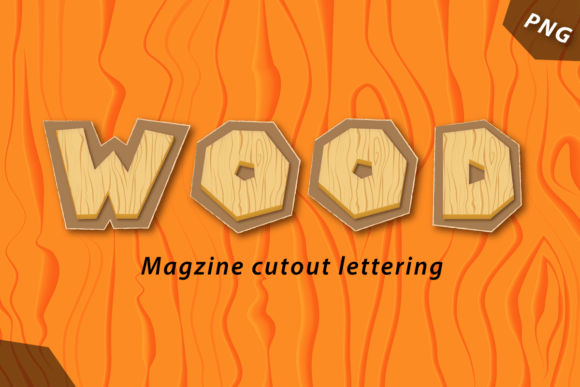
In the fast-paced world of digital design, finding assets that bridge the gap between high-end print quality and web-ready versatility is often a challenge. Designers frequently toggle between vector graphics for scalability and raster images for texture, often losing one benefit to gain the other. The introduction of 3D Magazine Wooden Cutout Lettering offers a solution that respects both mediums. This collection features 42 singular elements, each crafted with an authentic woodcut feel and rendered in high-resolution transparent PNG format. With dimensions of 6,000 x 5,000 pixels at 300 dpi, these assets are engineered to serve dual purposes: they are crisp enough for large-format printing and optimized for seamless integration into digital interfaces.
Understanding how to incorporate these assets into your existing workflow requires more than just downloading files; it demands a strategic approach to asset management, layering techniques, and project planning. Whether you are a marketer creating social media campaigns, a publisher designing book covers, or an entrepreneur building brand identity materials, knowing where these elements fit in your production pipeline can significantly enhance efficiency and visual impact.
Pre-Production Planning and Asset Organization
Before opening your design software, effective preparation ensures that the 3D Magazine Wooden Cutout Lettering pack enhances rather than complicates your process. The first step in any professional workflow is organization. Given that this pack contains 42 unique elements, establishing a clear folder structure is essential. Create a dedicated directory for "Typography Assets" and subfolders for specific projects. Because these files are high-resolution PNGs, they will occupy more storage space than standard vectors. Ensure your local drive or cloud storage has adequate capacity to handle multiple iterations of your designs without slowing down your system.
Compatibility checks are another critical pre-production task. While PNG is a universal format, verifying that your design software handles large transparent layers efficiently is wise. Applications like Adobe Photoshop, Illustrator (with linked files), Affinity Designer, and Canva Pro support these formats well. However, if you are working on older hardware, consider creating lower-resolution proxies for initial layout drafts. This allows you to position the wooden letters and plan your composition without taxing your computer’s memory. Once the layout is finalized, you can swap in the full 6,000 x 5,000 pixel originals for final rendering.
Integration During the Design Phase
The core value of 3D Magazine Wooden Cutout Lettering lies in its ability to add tactile depth to flat designs. During the execution phase, these elements should not be treated as mere afterthoughts but as central components of your visual hierarchy. The authentic woodcut texture provides a natural contrast to clean, modern sans-serif fonts or minimalist backgrounds. This juxtaposition creates visual interest and guides the viewer’s eye through the content.
When placing these letters, pay close attention to lighting and shadow consistency. Although the PNGs are transparent, the 3D rendering includes inherent shading that suggests a specific light source. To maintain realism, align the direction of this embedded light with other elements in your composition. If your background features a light source from the top left, ensure the wooden letters are oriented or selected to match that perspective. This attention to detail prevents the "sticker effect," where assets look pasted on rather than integrated into the scene.
For web designers, the transparency of these PNGs is a significant advantage. It allows for non-destructive editing over complex backgrounds, such as gradient meshes, photographic textures, or patterned layouts. You can layer the wooden letters over images without needing to manually remove backgrounds, saving hours of masking work. This efficiency is particularly valuable in agile marketing environments where turnaround times are short. By using pre-rendered, high-quality assets, you reduce the time spent on manual retouching and focus more on overall composition and messaging.
Optimizing for Print and Digital Outputs
One of the standout features of this collection is its suitability for both print and web. However, the workflow for each output differs. For print projects, such as brochures, posters, or packaging, the 300 dpi resolution ensures that the intricate wood grain details remain sharp even at larger sizes. When preparing files for print, always work in CMYK color mode if your printer requires it, though keep in mind that PNGs are typically RGB. You may need to convert the color profile in your design software to ensure accurate color reproduction. Test prints are recommended to verify that the dark tones of the wood do not become muddy when inked on paper.
Conversely, for digital use, file size optimization is key. A 6,000 x 5,000 pixel PNG can be several megabytes in size, which may slow down website loading times if used directly. For web applications, resize the images to the exact dimensions needed for display. If the letter will appear at 500 pixels wide on a screen, scale it down before exporting. Use compression tools to reduce file size without visible quality loss. This practice maintains the visual appeal of the 3D Magazine Wooden Cutout Lettering while ensuring optimal performance across devices and connection speeds.
Enhancing Brand Identity and Storytelling
Beyond technical implementation, these assets play a crucial role in storytelling. The wooden aesthetic evokes feelings of craftsmanship, authenticity, and warmth. For brands aiming to project an organic, eco-friendly, or artisanal image, integrating these letters can reinforce their narrative. Use them in headers for blog posts about sustainability, in logos for handmade goods stores, or in educational materials that emphasize traditional skills.
Consider the psychological impact of texture. In a digital landscape dominated by flat design and smooth gradients, the rough, tangible quality of woodcut lettering stands out. It invites users to pause and engage. For educators and publishers, this can make learning materials more engaging. For marketers, it can increase click-through rates by breaking visual monotony. The key is consistency; use the wooden letters as part of a broader design system that includes complementary colors, fonts, and imagery. This cohesive approach builds brand recognition and trust.
Quality Control and Long-Term Usability
Maintaining quality control throughout your project lifecycle ensures that the final product meets professional standards. Regularly zoom in to 100% or 200% to check for pixelation or edge artifacts, although the high resolution of these PNGs minimizes such risks. Verify that the transparency is clean and that no unwanted halos surround the letters. If you notice minor imperfections, most design software allows for quick cleanup using eraser tools or layer masks.
Long-term usability also depends on how well you document your usage. Keep a record of which projects utilized specific letters from the 42-element pack. This helps in maintaining consistency across campaign series or recurring publications. If you find certain letters work better for headlines while others suit subheaders, note these preferences for future reference. Over time, this accumulated knowledge streamlines your decision-making process, allowing you to deploy assets more effectively.
In conclusion, the 3D Magazine Wooden Cutout Lettering pack is more than a collection of graphics; it is a versatile tool that fits seamlessly into modern creative workflows. By planning your asset organization, respecting lighting and perspective during integration, optimizing for specific output mediums, and leveraging the emotional resonance of wood textures, you can elevate your designs. Whether you are crafting a high-impact print ad or a responsive web banner, these elements provide the depth and quality needed to stand out in a crowded digital space. Embrace the blend of traditional craftsmanship and modern technology to create work that is not only visually striking but also professionally robust.